 Fire Stick
 Latest version: v4.9.9 (9th Sept 2016)
This add-on allows you to install the Platinum Wizard to install the latest Platinum build
***You must have KODI v16 or higher to install this. To check and install v16 follow this guide:
http://www.firestickkodi.com/upgrade-to-kodi-v16-jarvis/
To Install:
- Open Kodi
- Select SYSTEM > File Manager
- Select Add Source
- Select None
- Type the following EXACTLY http://www.gabbotech.com/repo3 and select Done

- Highlight the box underneath Enter a name for this media Source & type GabboRepo
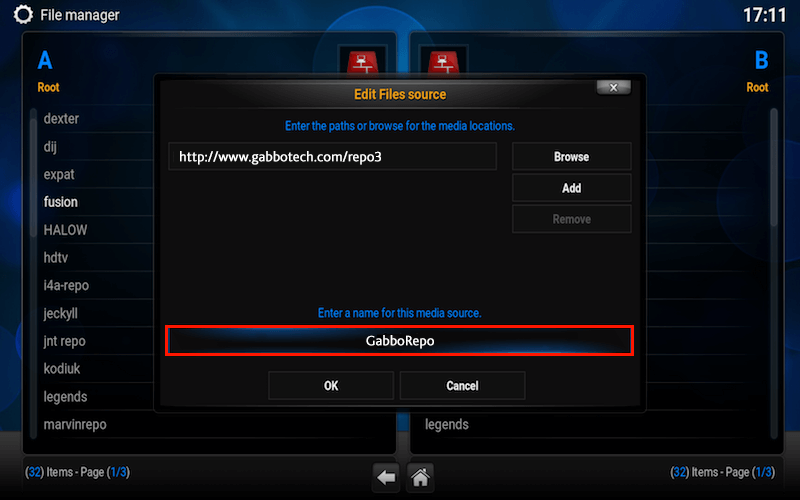
- Select OK

- Go back to your Home Screen
- Select SYSTEM
- Select Add-Ons
- Select Install from zip file
- Select GabboRepo

- Select Install

- Select repository.gabbo-1.1.zip

- Wait for Add-on enabled notification “Gabbo Repo Enabled”

- Select Install from repository or Get Add-Ons on Helix
- Select GabboRepo

- Select Program Add-Ons

- Select Platinum Wizard

- Select Install

- Wait for Add-on enabled notification

Platinum Wizard is now installed
- Go to Programs

- Select Platinum Wizard

- Select Install Platinum

- Select Install Latest Build

- Let it download and extract


- Once it is finished select okay

- When it asks to close Kodi. DON’T CLICK YES – PULL THE PLUG FROM THE STICK TO RESET IT, THEN PLUG IT BACK IN AFTER A FEW SECONDS TO POWER IT UP.

The Platinum Build should now be installed.